 SCREEN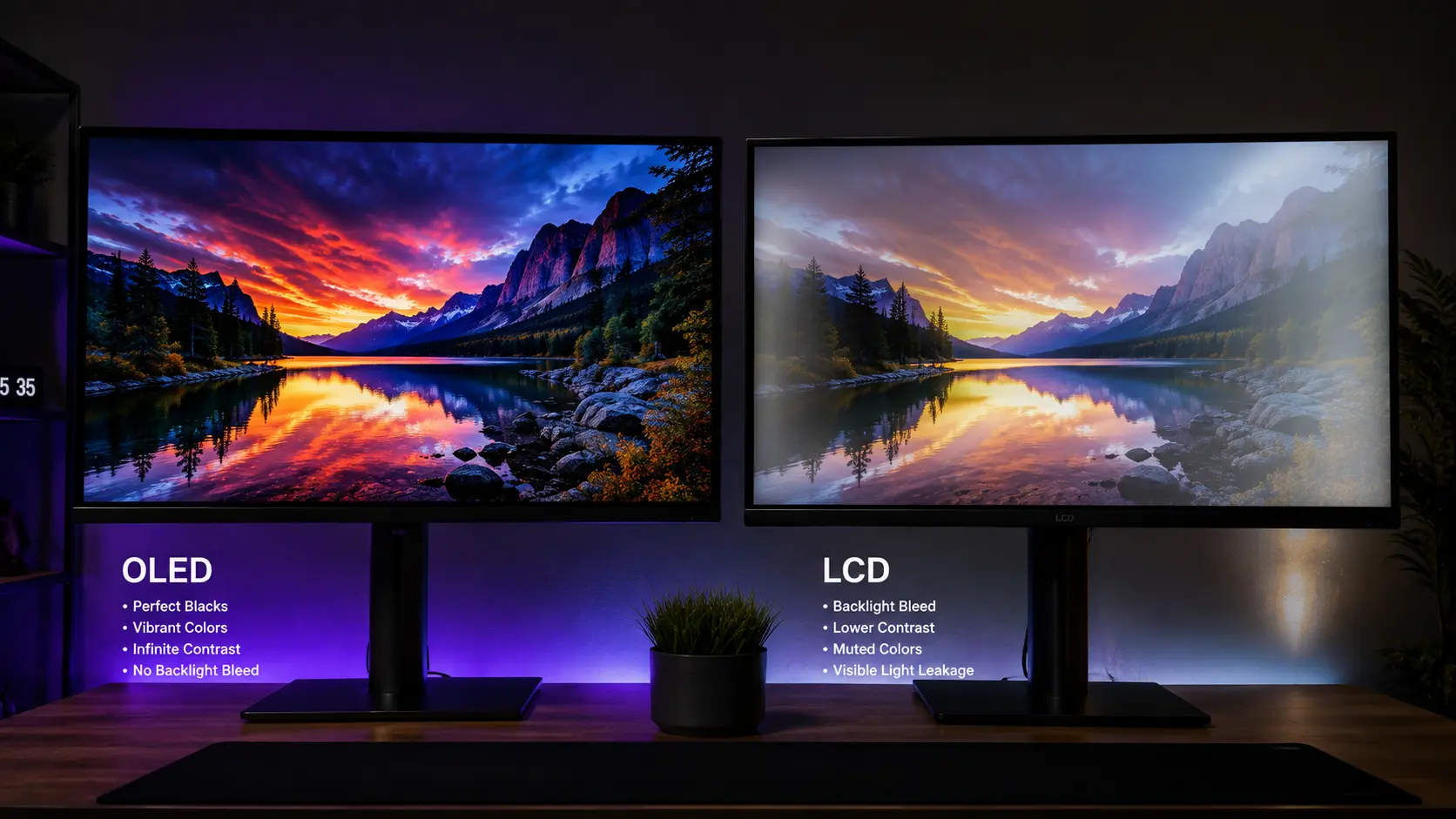
📌 Quick Summary: OLED delivers perfect blacks, infinite contrast, and near-instant response times — but comes with burn-in risk and a higher price. LCD (especially Mini-LED) offers higher brightness, no burn-in, and better value. The best choice depends entirely on your use case.
I still remember the first time I saw an OLED display in person. It was a demo unit in a tech store, showing a dark space scene from a movie. The stars were pinpricks of light against a deep, inky black. No glow. No backlight bleed. No compromise.
I was hooked. I bought my first OLED monitor a year later. And then I learned the hard way what every OLED owner eventually discovers: the picture quality is unbeatable, but it comes with real trade-offs.
Since then, I've owned both OLED and LCD monitors. I've reviewed dozens of displays, tested them with the Screen Medic diagnostic tool, and helped thousands of users make the OLED vs LCD decision for themselves.
Here's the truth that took me years to fully understand: there is no universal "better" technology. OLED wins on picture quality. LCD wins on longevity and value. The right choice depends entirely on how you use your screen, what you value most, and what trade-offs you're willing to accept.
This guide will walk you through every major difference between OLED and LCD — picture quality, burn-in risk, brightness, gaming performance, and price. By the end, you'll know exactly which technology is right for you.
How OLED and LCD Actually Work
To understand the differences, you need to understand how each technology produces an image. It's simpler than it sounds.
How LCD Works
LCD stands for Liquid Crystal Display. Here's the basic structure:
- A backlight produces white light behind the screen (LED or Mini-LED)
- Liquid crystals act like tiny shutters, blocking or allowing light through
- Color filters (red, green, blue) give each pixel its color
- Polarizing filters control the light's direction
Here's the key limitation: LCD pixels can't turn off completely. Even when displaying black, some light leaks through. That's why LCD blacks are actually dark gray, and why you see "IPS glow" or "backlight bleed" in corners.
Mini-LED improves this significantly by using hundreds or thousands of tiny LED zones. When a zone is black, it dims. This creates much deeper blacks — but it's still not perfect. You can sometimes see "blooming" around bright objects on dark backgrounds.
How OLED Works
OLED stands for Organic Light-Emitting Diode. Here's the key difference:
- Each pixel emits its own light — no backlight needed
- Pixels can turn off completely — creating true, absolute black
- No backlight bleed, no IPS glow, no blooming
When an OLED pixel is off, it emits zero light. The result is infinite contrast, perfect blacks, and an image that feels almost three-dimensional.
But there's a catch: OLED pixels are made of organic compounds that degrade over time. When some pixels age faster than others, you get burn-in.
Picture Quality: OLED Wins (But Not by as Much as You Think)
Let's start with the most obvious difference: picture quality.
Contrast and Blacks
This is OLED's biggest advantage, and it's not even close. OLED produces true black — pixels that emit zero light. LCD, even with Mini-LED, can't match this. The best Mini-LED displays get close, but you can still see halos around bright objects on dark backgrounds.
The result: OLED has infinite contrast ratio. LCD tops out at around 3000:1 to 10000:1 with Mini-LED. In a dark room, the difference is striking. Movies and games look more immersive, more cinematic, more real.
Color Accuracy
Modern OLED and high-end LCD panels both offer excellent color accuracy. Both can cover 99%+ of the sRGB gamut. Both can support 10-bit color. For professional work, either technology can work — as long as you calibrate it.
However, OLED has a slight edge in color volume — the ability to display saturated colors at high brightness. This matters for HDR content. But for SDR work, the difference is minimal.
Viewing Angles
OLED wins here too. Because each pixel emits its own light, OLED maintains color and contrast from virtually any viewing angle. LCD — especially VA panels — loses contrast and shifts color when viewed off-axis.
If you often watch content with others, or use your monitor from different positions, OLED is noticeably better.
Brightness
This is where LCD strikes back. High-end LCD displays can reach 1000–2000 nits of peak brightness. OLED typically tops out around 600–1000 nits (though the latest panels are improving).
In a bright room, this matters. LCD cuts through ambient light better. OLED can look dim or washed out in a sunny room. If your setup is near a window, LCD (especially Mini-LED) might be the better choice.
For a complete breakdown of monitor specs, read our Ultimate Monitor Buying Guide 2026.
Burn-In: OLED's Biggest Weakness
This is the elephant in the room. OLED burn-in is real. It happens when static content — taskbars, logos, HUDs — is displayed for extended periods, causing uneven pixel degradation.
The result is a permanent ghost image. It's subtle at first. Then it becomes impossible to ignore.
But here's the nuance most people miss: modern OLED panels are far more resistant than their reputation suggests. Manufacturers have implemented several protections:
- Pixel Shift — Subtly moves the image to prevent static pixels from aging unevenly
- Pixel Refresh — Runs a routine to exercise pixels evenly
- Auto-Brightness Limiter (ABL) — Reduces brightness when displaying large bright areas
- Logo Detection — Automatically dims static logos and taskbars
- Panel Improvements — Newer OLED materials (like LG's OLED evo) are more durable
With these protections, most modern OLED displays can go years without noticeable burn-in — if you use them responsibly. That means varying content, lowering brightness, and avoiding static elements.
For a complete guide to preventing burn-in, read our Complete Screen Burn-In Guide.
Who Should Avoid OLED?
If you fall into any of these categories, LCD might be the safer choice:
- You use your monitor for work with static elements — Taskbars, menus, spreadsheets
- You leave the same app open for hours — Trading terminals, coding, streaming
- You play the same game with a static HUD for hours daily — MMOs, MOBAs, competitive shooters
- You display news channels or static content all day — Like a TV in a waiting room
For everyone else, OLED is a manageable risk — especially with modern protections.
Gaming Performance: OLED Dominates
If you're a gamer, OLED has some serious advantages.
Response Time
OLED has near-instantaneous pixel response — typically 0.1ms to 0.3ms. LCD, even the best Fast IPS panels, is around 1ms. This means OLED shows virtually zero ghosting and unmatched motion clarity.
In fast-paced games, this is a real competitive advantage. You see enemies clearly. You track movement precisely. You react faster.
Refresh Rate
Both OLED and LCD offer high refresh rates. You can find 240Hz OLED monitors, and 360Hz+ LCD monitors. In terms of raw refresh rate, LCD still has the edge for extreme esports.
But OLED's superior response time often makes a bigger difference in practice than a small bump in refresh rate.
HDR Gaming
OLED wins HDR gaming hands-down. The combination of perfect blacks, infinite contrast, and excellent color volume creates a truly stunning HDR experience. LCD HDR — even Mini-LED — can't match it.
If you care about HDR gaming, OLED is the clear choice.
Input Lag
Both technologies offer excellent input lag in modern displays. The difference is negligible for most gamers.
For a complete guide to gaming monitor performance, read our How to Test Your Monitor Like a Pro article.
Longevity and Durability
Here's a topic most reviews gloss over: how long will your display actually last?
LCD panels are incredibly durable. They can run for years — often a decade or more — with minimal degradation. The backlight may dim slightly over time, but the pixels themselves rarely fail.
OLED panels have a finite lifespan. Each pixel degrades as it emits light. After thousands of hours, brightness decreases. After tens of thousands of hours, the degradation becomes noticeable.
In practice, modern OLED panels last 5–10 years for typical use. But heavy users — gamers who play 8 hours a day, or professionals who use their monitor as a work tool — may see degradation sooner.
If longevity is your top priority, LCD wins.
Price and Value
Let's talk money.
- Budget LCD (1080p, 60Hz, IPS): $100–$200
- Mid-range LCD (1440p, 144Hz, IPS): $250–$500
- High-end LCD (4K, 144Hz, Mini-LED): $700–$1,500
- OLED (1440p or 4K, 120–240Hz): $800–$2,000+
OLED is premium. You pay a significant premium for the picture quality. Whether it's worth it depends on your budget and priorities.
For most people, a mid-range LCD offers 80% of the experience at 30% of the price. That's excellent value.
But if you want the best — and you're willing to pay for it — OLED delivers an experience LCD can't match.
Mini-LED: The Middle Ground
Before you decide, consider Mini-LED. It's an LCD technology that uses hundreds or thousands of tiny LED zones for local dimming. It sits between traditional LCD and OLED:
- Better contrast than standard LCD — Deeper blacks, less backlight bleed
- Higher brightness than OLED — Great for bright rooms
- No burn-in risk — Same durability as LCD
- More affordable than OLED — Often $200–$500 less
The downside? Blooming. Bright objects on dark backgrounds can create a "halo" effect. It's not as clean as OLED, but it's much better than standard LCD.
If you want most of OLED's benefits without the burn-in risk, Mini-LED is worth considering.
QD-OLED: The Latest Innovation
QD-OLED (Quantum Dot OLED) is a newer technology that combines OLED with quantum dots. It offers:
- Higher brightness than standard OLED — Often 1000+ nits peak
- Better color volume — More vibrant colors at high brightness
- Same perfect blacks and contrast — As standard OLED
- Still has burn-in risk — Though improved durability
Samsung and Dell (Alienware) are the main QD-OLED manufacturers. If you're considering OLED, QD-OLED is worth the premium.
For a comparison of OLED and LCD in a specific context, read our Monitor Buying Guide.
Which Should You Choose?
Here's my honest recommendation based on your use case:
Choose OLED If:
- You want the best picture quality, period
- You watch a lot of movies and HDR content
- You're a gamer who values motion clarity and response time
- You use your monitor in a dark or controlled-light room
- You're willing to manage burn-in risk (vary content, lower brightness)
- Budget isn't your primary concern
Choose LCD (Mini-LED) If:
- You use your monitor for productivity with static elements
- You work in a bright room
- You want maximum brightness
- You value longevity and durability
- You want the best value for money
- You're worried about burn-in
Choose Standard LCD (IPS) If:
- You're on a tight budget
- You need a reliable, no-frills monitor for work
- You don't game competitively or watch much HDR content
- You want the best value for general use
What About Testing Your Display?
No matter which technology you choose, test your new monitor immediately after purchase. Both OLED and LCD can have defects out of the box:
- Dead pixels — Both technologies
- Stuck pixels — Both technologies
- Uniformity issues — Especially LCD
- Burn-in — OLED (though rare on new panels)
- Ghosting — Both, especially VA LCD
Use our free Screen Medic diagnostic tool to run all the essential tests in under 60 seconds. No download, no signup, no data collection. Just a fast, accurate picture of your display's health.
For a complete step-by-step guide to testing, read our article: How to Test Your Monitor Like a Pro: 5 Essential Checks.
Final Thoughts: There's No Wrong Choice — Only the Right Choice for You
Here's the truth I wish someone had told me years ago: both OLED and LCD are excellent technologies. Neither is universally better. The "best" choice depends entirely on how you use your screen, what you value most, and what trade-offs you're willing to accept.
OLED delivers the best picture quality you can buy. It's stunning for movies, games, and HDR content. But it comes with burn-in risk and a higher price.
LCD — especially Mini-LED — offers excellent value, high brightness, and no burn-in risk. It's the practical choice for most people.
Whichever you choose, test it immediately. Your return window is your leverage. Use it. Run a diagnostic. Check for defects. And if something's wrong, return it — no questions asked.
Use our free Screen Medic diagnostic tool to test your new display in under 60 seconds.
Related Guides
Expand your display knowledge with these related articles:
- The Ultimate Monitor Buying Guide 2026: How to Choose the Perfect Screen
- How to Test Your Monitor Like a Pro: 5 Essential Checks (2026 Guide)
- What is Screen Burn-In? How to Detect, Prevent, and Fix It (2026 Guide)
- How to Fix Screen Burn-In — 5 Proven Methods (2026 Guide)
- Monitor Ghosting Explained: Causes, Tests, and How to Fix It (2026 Guide)
- What is a Dead Pixel? The Complete 2026 Guide to Detection, Warranty, and Fixes
💬 Leave a Comment
Have a question or something to add? Share your thoughts below.
Loading comments...